I build AI assistants, automations and small web apps for property management offices. Replies to residents are drafted, meter readings are checked by a person, notices wait for approval. Your staff make the final call.
Everything happens in writing — you'll get a concrete plan back, not a sales call.
Faster first replies
Simple questions get a drafted answer from the building's documents the same evening. Anything sensitive waits for a person.
Fewer things slip
Open notices, renewals and reminders sit on one list with a follow-up date and an owner.
On your stack
I connect to the tools you already use where they allow it, through an API or exports. Nothing to migrate.
If a process is repetitive and follows rules, it's a candidate. Part of this runs today at one real portfolio: a staff assistant that drafts replies, meter photos read and confirmed by a person, and a move-out video app the client is testing. The rest is what I build for you, with no past result claimed.
I set up quick replies from your listing data and questions based on your criteria, so good leads can book a showing in your calendar. What I build for you, no past result claimed.
See how it works →Signing the lease starts the checklist: access info, house rules, the first invoice and the move-in video request, each with an owner and a due date. What I build for you.
See how it works →An assistant drafts answers from each building's own documents to the questions your managers repeat all day. Staff approve before anything is sent. A staff version runs today at one portfolio.
See how it works →A reported violation is logged with the photo and the matching house rule, and a draft notice waits for the manager. Open notices sit on one list with a follow-up date. What I build for you, not running at a client yet.
See how it works →Noise, disputes and safety concerns are logged, sorted by urgency and sent to the right person, with a same day reply to the resident. What I build for you.
See how it works →Tenants record a short guided video from a QR link, with no inspector visit to schedule. It is dated, checked and filed against the unit. Deployed at one portfolio, where the client is testing it now.
See how it works →I can build one custom system for buildings, units, meters and inspections instead of five spreadsheets, and connect the automations above to it.
Approvals, internal reports, handoffs between teams, anything specific to how your firm runs day to day — if it's repetitive and follows rules, it's very likely automatable, even if it's not one of the systems above.
A short written brief — what happens today, who does it, where it actually hurts. No call to schedule, no particular format required.
What gets automated, what stays human, what it connects to, timeline and cost. In writing, so you can forward it internally and decide without a meeting.
I connect it to the software you already use, where that software allows it. Your staff keeps approval control over anything that reaches a tenant or an owner.
Typical toolkit: Make, n8n, Claude API, picked to fit the job. · Your tools: I connect to the ones you use where they allow it, through an API or exports. That includes Google Workspace, Outlook, and property or accounting software such as Yardi, Buildium, AppFolio or QuickBooks, checked against your account before I promise anything.
Anything tenant-facing goes out only after your team approves it — until you decide that's no longer necessary.
Everything runs in your own accounts — your email, your software, your storage. Nothing lives on my servers.
Automation connects to your property management software where it allows it. You keep your systems, records and workflows.
Error alerts, retry logic, and a clear fallback to manual — a failure is a notification, not a surprise next week.

I'm Alex Shylo, an AI automation engineer. I build automations and small web apps for property management, e-commerce and service businesses. In property management, one portfolio runs an internal web app I built, on its own server: staff get drafted replies and tasks from each building's profile, and meter photos are read and confirmed by a person. Staff review everything before it goes out.
Send me a couple of sentences about your situation and you'll get back a specific plan — what to automate first, what it takes, what it costs. If it's not a fit, I'll say so, and you'll have lost five minutes reading an email.
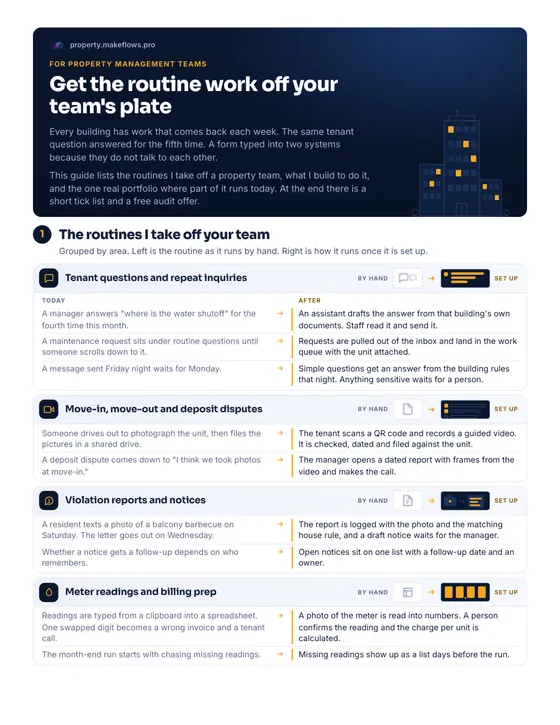
A short PDF, three pages. The routines a property team handles, grouped by area, with how each one runs by hand and how it runs once it is set up. At the end, a tick list for your office and the free 20-minute routine audit.
Download the checklist (PDF)No email needed. Opens in a new tab.
The same idea in 30 seconds, no sound.
Two or three sentences about the most annoying repetitive process in your office. You'll get a concrete answer, not a pitch deck.